Search the web

Labels

youtube (24) lego (13) toys (12) home cinema (10) linux (9) ubuntu (8) klicky (7) boxee box (3) MacOS X (2) Vienna sightseeing (2) digital cameras (2) Starwars (1) Wii U (1) android (1)

Thursday, July 21, 2011

Welcome home Atlantis! Farewell Space Shuttle! The end of an era....

STS-135 successfully ended on July 21st 2011. The space shuttle Atlantis returned safely from its last mission, marking marking the end of NASA's 30-year space shuttle program.

As a tribute I built my own "Lego Space Shuttle"...


..and I bought a new one! Lego City 3367.

Wednesday, July 20, 2011

Hackintosh - How to re-enable audio after software update to MacOS X 10.6.8

On my hackintosh I'm using a Gigabyte GA-EP45-UD3LR. I've installed Mac OS X 10.6 with KAKEWALK from a retail Snow Leopard DVD I purchased from our local Apple store.

As I updated from 10.6.7 to 10.6.8 via software update audio functions were totally gone. I used to keep a backup of my AppleHDA.kext, re-installing this kext brings audio function back. I am not using VoodooHDA or legacyHDA. If these are there - delete them.

This method is easy, all you need is kext utility (registration neccessary!)

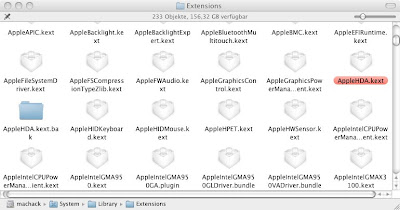
Step 1: Delete the new AppleHDA.kext that came with the software update (you will find it in your system/library/extensions folder):


you'll need your root password!

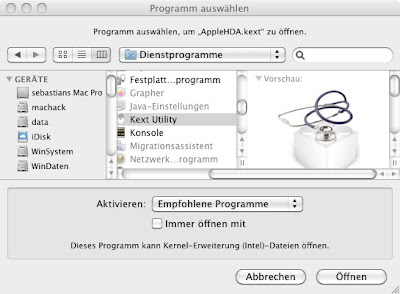
Step 2: Open your backup of your old AppleHDA.kext with kext-utility:


...hit "open" and enter your root password!


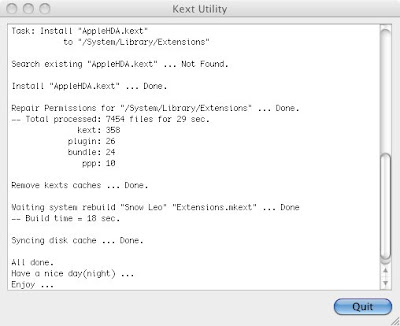
Step 3: Wait for a moment:


...kext utility just installed your old AppleHDA.kext.

After a reboot your sound should be working again!

Thursday, July 14, 2011

chiliGREEN USB HDMI Mediaplayer Review

I was looking for a cheap USB media streaming client, that supports 1080p .mkv videos to watch it on my TV.
Got the chiliGREEN USB mediaplayer with following features:
  • SD-cardreader/USB port
  • 1080p playback via HDMI (max. 30fps)
  • video support: MPEG 1/2/4, Divx, Xvid, H.264, VC-1 RM/PMVB
  • audio support: MP3, WMA, M4P (AAC), HE-AAC, OGG, MP2, WAV
  • file format: MKV, AVI, MPG, TS; VOB, DAT, MP4, WMV, RM, RMVB, MP3, WMA, M4P (AAC), HE-AAC, OGG, MP2, WAV, JPEG, BMP, PNGOn 


SD Cardreader
Reviews on this mediaplayer are rare. One negative review claims that the Chiligreen player is quite ok, but the remote control is very poor.

I paid € 39,90 for it, which is quite cheap for a full hd player.

Unboxing and first review (a youtube cover will follow within the next days).
Good news about the remote control. The device is reacting properly to any command by the remote, no problems at all.
Smaller than cigarettes
The bad thing is, HFS+ formatted USB harddrives are not supported. Connecting my HDD gives me an error, that the device was not able to read it. (So I could not test .mkv full HD playback capabilities so far!)
What I can tell is that there is no support for video_ts folders. .ifo files are not playable. NO DVD-menues. That is an absolute NO GO.
The device is doing fine with SD xVid and DivX and 720p .mp4 (h.264).
.mp3 playback is possible, but without id3 tag showing!

Wednesday, July 13, 2011

How to install ATI / AMD Catalyst 11.5 in Ubuntu 11.04 Natty

I could not find the latest driver for my ATI 4200 of my HP 625 in the repositories of Ubuntu 11.04. I was trying to get VAAPI running for hardware accelerated h264 video playback in VLC. I did not work.

After some research I managed to get the driver running – but still no VA video!


It should be working with the stuff from from the ubuntu x-team:

sudo add-apt-repository ppa:ubuntu-x-swat/x-updates
sudo apt-get update
sudo apt-get upgrade

If you want to install the linux drivers from AMD start with removing ubuntu’s fglrx (if it was installed by jockey) with


sudo apt-get remove --purge fglrx*

Downloading the driver in a new directory


mkdir ~/Downloads/amd
cd ~/Downloads/amd
wget http://www2.ati.com/drivers/linux/ati-driver-installer-11-5-x86.x86_64.run

With the  downloaded script we can start building the packages:


sudo sh ati-driver-installer-11-5-x86.x86_64.run --buildpkg Ubuntu/natty

Install the built packages with


sudo dpkg -i *deb
sudo aticonfig --initial -f


will detect your grafx adapter. After a reboot my ATI 4200 was working with the new driver!

The lates drivers are available from ATI driver download . Just replace the download-link in the “wget-command”.

Monday, July 11, 2011

Wifi (Wlan) on Acer Travelmate Timeline X 8172 Z – Ubuntu 11.04

After installing ubuntu 11.04 amd64 desktop on my Acer Timeline X 8172 Z there was no Wireless working.
 
sudo apt-get update                 – followed by
sudo apt-get upgrade              …wifi is still not available.

Jockey tells me, the proprietary STA driver is installed and active.  …still no wireless.

Load and unload the acer_wmi kernel module
sudo modprobe -v acer_wmi
sudo rmmod acer_wmi

After a reboot, the wireless LED was on, but still no wireless.

Setting up acer_wmi startup parameters:
echo “options acer_wmi wireless=1″ | sudo tee /etc/modprobe.d/acer_wmi.conf
Reboot.
BINGO: Wireless is working. …but you must not use the fn+F3 hotkey to turn off/on the wireless/bluetooth function. I will lead to a “system-freeze” that requires a hard reboot.
What causes the system-freeze? I do not know. Most people believe it is a Kernel bug in Linux-kernel 2.6.38. Because the system-freezes do not occur in the 2.6.39 mainline kernel.
I found another sollution:

Blacklisting the B43 system-device-driver with:
 
echo “blacklist brcm80211″ | sudo tee -a /etc/modprobe.d/blacklist.conf
…after a reboot I finally solved the wireless-problem!

The wifi-hotkey is working too:
After every reboot state is 1 (“options acer_wmi wireless=1″ ?! )
1: WLAN:on Bluetooth:off
2: WLAN:on Bluetooth:on
3: WLAN:off Bluetooth:on
4: WLAN:off Bluetooth:off
5: WLAN:off Bluetooth:on
6: WLAN:off Bluetooth:off

01:00.0 Network controller: Broadcom Corporation BCM43225 802.11b/g/n (rev 01)

Linux kernel power problems solved?

According to PHORONIX the leading cause of the recent linux kernel problems is found.
The workaround finds its way into Ubuntu 11.04 with
sudo gedit /etc/default/grub
This will open an editor window. Find GRUB_CMDLINE_LINUX_DEFAULT=”quiet splash”
and change it to
GRUB_CMDLINE_LINUX_DEFAULT=”quiet splash pcie_aspm=force”
Save the file and close the editor.

You must not forget to update grub with:
sudo update-grub

USB tethering with android 2.1 handset (Samsung Galaxy) – Ubuntu 11.04

Neither an app is needed nor an android 2.2 (or later) handset.

I am using a Samsung Galaxy 5 (GT I 5500), android 2.1.

Just attach your phone using your USB data cable.

Click on the network manager applet an choose “New Mobile Broadband (GSM) connection”.


The assistant will open immediately. Click “Forward”!


Choose your region.


Choose your provider.


Chose your billing plan, in my case “Default” will do it.


Confirm your settings!


BINGO! Connection established.


ATTENTION: Do not attach your phone before log-in.
Otherwise your phone will not be recognized.

I'll be testing this how-to with some other androidhandsets.
Next one will be a HTC Desire smartphone.