Search the web

Labels

youtube (24) lego (13) toys (12) home cinema (10) linux (9) ubuntu (8) klicky (7) boxee box (3) MacOS X (2) Vienna sightseeing (2) digital cameras (2) Starwars (1) Wii U (1) android (1)
Showing posts with label MacOS X. Show all posts

Sunday, August 21, 2011

WLAN (WiFi) USB Stick for Hackintosh? Mac OSX 10.6

I ordered the Hama Wireless LAN USB 2.0 Stick 300 Mbps from Amazon as a WLAN extension for my TV set (Samsung  LE40D550).
Hama Wireless LAN USB 2.0 Stick 300 Mbps


As I discovered the "MAC logo" on its packaging I connected the USB stick to my hackintosh.
First there was no reaction at all, the stick will not be recognized as an airport component.
MAC logo!!! Hackintosh?

On the included support cd there device drivers for MAC OSX 10.3/10.4, but those are not working under 10.6.

So I checked Hama's website and downloaded the MAC OSX 10.5/10.6 driver fome here.


After installing the driver I had to reboot my machine. After the reboot I re-connected the USB-stick. This will open the RALINK Wireless Utility.
Installation is now complete. 
If you want to save your settings, you will have to add a profile in the "profile-tab".

After installing the Ralink Wireless Utility shut down time increased by 15 seconds.

I don't know if it is working under 10.7 Lion as well. 


Wednesday, July 20, 2011

Hackintosh - How to re-enable audio after software update to MacOS X 10.6.8

On my hackintosh I'm using a Gigabyte GA-EP45-UD3LR. I've installed Mac OS X 10.6 with KAKEWALK from a retail Snow Leopard DVD I purchased from our local Apple store.

As I updated from 10.6.7 to 10.6.8 via software update audio functions were totally gone. I used to keep a backup of my AppleHDA.kext, re-installing this kext brings audio function back. I am not using VoodooHDA or legacyHDA. If these are there - delete them.

This method is easy, all you need is kext utility (registration neccessary!)

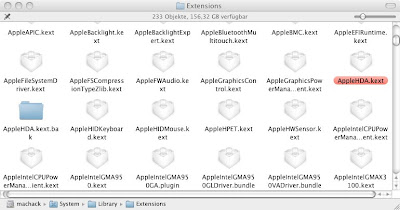
Step 1: Delete the new AppleHDA.kext that came with the software update (you will find it in your system/library/extensions folder):


you'll need your root password!

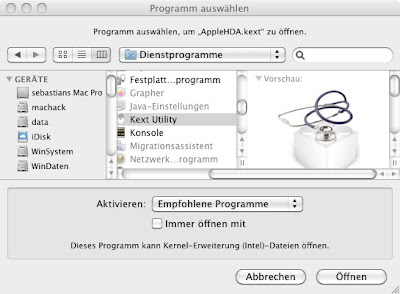
Step 2: Open your backup of your old AppleHDA.kext with kext-utility:


...hit "open" and enter your root password!


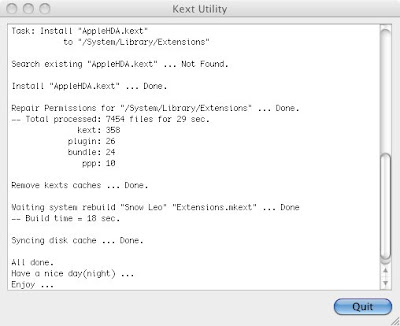
Step 3: Wait for a moment:


...kext utility just installed your old AppleHDA.kext.

After a reboot your sound should be working again!